Most ERP vendors will tell you you can be live in 90 days. Best for: fast-growing small businesses looking for one system for financials, inventory and ecommerce
For good reason, NetSuite is Oracle’s cloud ERP and the most recognizable name on this list: it handles financials, CRM, inventory and ecommerce from one login, and scales neatly as headcount grows. The tradeoff is the cost. The base platform for NetSuite costs $999 per month, and users pay between $99 and $199 per month. Therefore, a typical small deployment will run you anywhere from $12,000 to $60,000 a year.
Most ERP buyers find the real number is closer to 9 months, sometimes longer. That gap between sales promises and lived experience is the number one source of frustration on buyer forums, and is why getting a straight answer on erp implementation timeline is more important than almost any other question in the evaluation process.
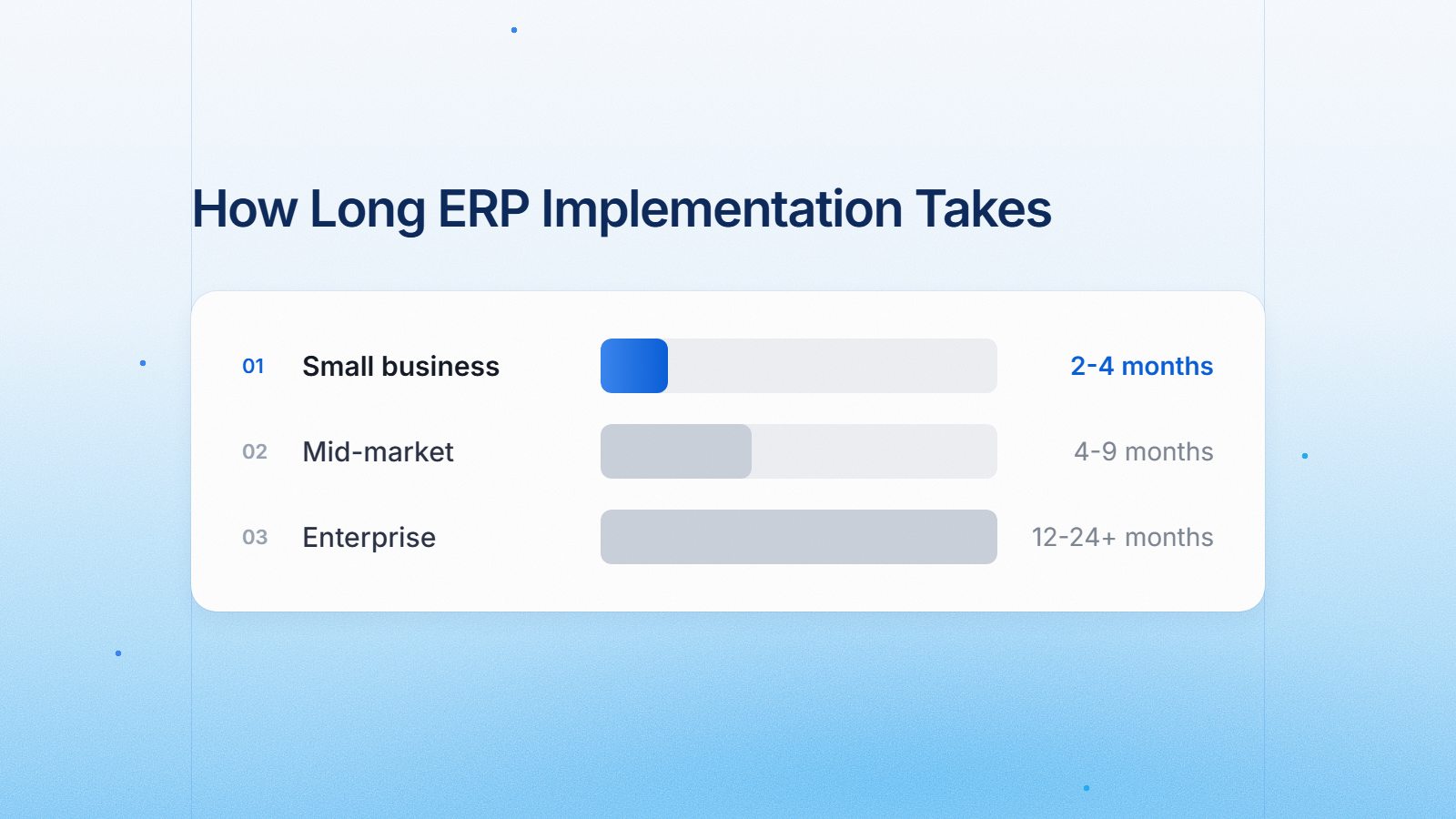
The average ERP implementation timeline is 2-4 months for small business, 4-12 months for mid-market and 12-24 months or more for large enterprise. According to Panorama Consulting Group’s 2026 ERP Report, a survey was conducted with 170 organizations, with data collected from January 2025 to January 2026. The median project timeline among those surveyed was nine months.
This guide breaks the timeline into phases, outlines the typical costs of each phase and explains why two companies purchasing the same software can have vastly different go-live dates.
Business Size ERP Implementation Timeline
The first variable buyers ask about is company size, but it is not the only one. But the scope, data quality and deployment model (cloud vs on-premise) are equally, sometimes more, important.
A small business going live on a standard cloud deployment can be up and running in 8 to 16 weeks, a mid-market organization typically takes 4 to 9 months, and a large multi-entity enterprise with heavy customization can run 12 to 24 months or longer. ERP implementations typically run 4 to 12 months.
A different industry composite that weights heavier enterprise transformations more aggressively places the single most quoted recent average at nine months, taken from Panorama Consulting’s 2025 ERP Report, while a broader industry composite places the all-in average closer to twenty-one months once the largest enterprise transformations are weighted in.
| Business size | Users | Typical deployment | Realistic timeline |
|---|---|---|---|
| Small business | 5-25 | Cloud, near-standard configuration | 2-4 months |
| Mid-market | 25-250 | Cloud, moderate configuration plus integrations | 4-9 months |
| Enterprise | 250+ | Multi-entity, multi-country, heavy customization | 12-24+ months |
Source: ERPSoftwareBlog, 2026
Size table is a guideline, not a guaranty. A 2026 Panorama study reports a median of nine months, and ERP Research reports a median of six months among published case studies that shared a timeline, and ERP implementation timelines depend more on scope than company size.
Step by Step ERP Implementation Timeline
All practical implementation plans boil down to the same fundamental stages, even if vendors use different names for them. Understanding what happens in each phase helps you see where your own project is likely to slip.
For a mid-market benchmark, discovery and requirements normally takes 2 to 4 weeks (10% of the project), project planning and governance 1 to 2 weeks (5%), solution design 3 to 5 weeks (15%), build and configuration 4 to 8 weeks (25%), data migration 3 to 6 weeks running in parallel (15%), testing (SIT and UAT) 3 to 5 weeks (15%), training and go-live 2 to 4 weeks (10%).
| Phase | Typical duration | Share of project |
|---|---|---|
| Discovery and requirements | 2-4 weeks | ~10% |
| Project planning and governance | 1-2 weeks | ~5% |
| Solution design | 3-5 weeks | ~15% |
| Build and configuration | 4-8 weeks | ~25% |
| Data migration (parallel) | 3-6 weeks | ~15% |
| Testing (SIT and UAT) | 3-5 weeks | ~15% |
| Training and go-live | 2-4 weeks | ~10% |
Source: ERPSoftwareBlog, 2026
Why data migration is the most critical step to blow the timeline
Buyers don’t give enough time for cleaning legacy data and it ends up as a schedule problem, not a data problem. Data migration is a pain point for around 49% of organizations. Legacy systems may store data in outdated or incompatible formats and the data may have become duplicated, inconsistent or incomplete over time. One pattern that continues to surface in post mortems is that teams don’t find out about the mess until the schedule is locked. Teams often discover three to six months before go-live that their legacy data is much messier than they expected, with duplicate vendors, mismatched product codes and incomplete customer records, and by then it’s too late to easily fix it.
Big Bang vs Phased Rollout: Which Can Be Finished Faster
Buyers faced with the choice of a cutover or a module-by-module rollout have a real trade-off between speed and risk. This would be a phased rollout by module (financials first, sales, purchasing, production) with each phase being 3 to 9 months apart. Each phase has a lower risk and easier change management, but has the integration risk between the old and new systems for a period of time, and will have a longer overall timeline. This is the best fit for larger mid-market and enterprise implementations where the cutover risk of a true big bang is unacceptable.
What is the cost of an ERP implementation at each stage of the timeline Cost and timeline go together. A compressed schedule usually means less customization and fewer consultant hours; a longer one usually means more of both.
The biggest cost drivers here are consulting fees, data migration and customization. A typical implementation will cost 1-3x the annual software license for mid-market systems and 2-5x for enterprise platforms. This works out to be $25,000 to $150,000 for SMBs, $150,000 to $750,000 for mid-market, and $750,000 to $5 million or more for enterprise. Another benchmark study found similar territory for mid-market buyers: Average ERP cost for mid-market companies in 2026 comes in at about $450,000 when including software, services, integration and migration, with a range of $300,000 to $700,000 for companies between 50 and 500 employees.
| Vendor | Typical implementation range | Typical timeline | Key cost driver |
|---|---|---|---|
| SAP Business One | 25,000-150,000 | 3-6 months | Number of add-ons, localization requirements |
| Odoo | 10,000-100,000 | 2-6 months | Community vs Enterprise tier, number of apps |
| NetSuite (SuiteSuccess) | 25,000-75,000 | 90-120 days | Standardized vs custom workflow depth |
| NetSuite (custom) | 75,000-500,000+ | 4-18 months | Multi-entity structure, integration count |
| Dynamics 365 Business Central | 40,000-400,000+ | 3-9 months | Customization depth, legacy data conversion |
What Drives Expenses Beyond the Usual
Buyers tend to underestimate the line item of customization at the quoting stage. Standard implementations with minimal configuration may take ~100 consultant hours to complete, but custom integrations, custom reporting, or industry-specific logic can take 700+ consultant hours at a rate of $150 to $350 per hour. That one variable is the reason why two companies could have the same number of employees, but their bills can be very different.
NetSuite, SAP Business One, Dynamics 365, Acumatica et Odoo : Timeline vs.
Vendor selection affects the timeline as much as company size since each platform has varying degrees of pre-built configuration.
NetSuite A mid-market company can expect to take 4-6 months to implement NetSuite. Oracle’s Suite Success methodology can reduce this timeline to 90-120 days for companies that adhere to standard best-practice workflows. Complex multi-entity or highly customized implementations can take 9-18 months. Compare plans in NetSuite profile.
SAP Business One SAP Business Typically, one implementations run 3 to 6 months, with the upper end dictated by the number of add-ons and localization requirements a buyer needs. Read the complete profile of SAP Business One.
Microsoft Dynamics 365 Business Central The typical implementation time for Dynamics 365 Business Central is 3 to 9 months for most small and mid-sized businesses, but the true answer depends on things like scope, data complexity, integrations, and customization needs. Check the price of the Microsoft Dynamics 365 profile.
Acumatica
A simple Acumatica implementation could take four to six months. See the Acumatica profile for the deployment options.
Odoo implementations usually take 2 to 6 months. The majority of this difference is explained by the difference in customization levels between the Community and Enterprise tiers. Verify modules on Odoo profile.
Cloud vs On-Premise ERP: How Timeline Varies with Deployment Model
The deployment model is the key variable that accounts for most of the recent compression in average ERP timelines. One of the clearest trends in current ERP implementation statistics is cloud use. According to Panorama, 73.5% of the software deployments in its study were cloud, hosted, managed or SaaS, while on-premise systems accounted for 26.5%.
The reduced timelines that buyers are seeing are also a direct result of the move to Cloud. According to Panorama Consulting’s 2025 ERP Report, the average ERP project duration has fallen from 15.5 months to 9 months from one reporting cycle to the next. The firm credits the trend almost entirely to the rapid adoption of SaaS and pre-configured cloud ERPs. That’s why buyers comparing options on the ERP software hub will notice that nearly every modern vendor now leads with a cloud-first or cloud-only deployment.
What Extends an ERP Implementation Beyond the Estimate
Buyers who research this topic on Reddit and Quora all ask a version of the same question: why was the vendor’s quoted timeline half the real one? The pattern of research is the same in all the sources.
Most ERP implementation failures are not about the software but about how the project was set up, and the most common patterns are requirements written after vendor selection, scope creep without governance, dirty data going into migration, executive sponsorship that fades after kickoff, underestimated change management, customization as a substitute for process fixes, late integration architecture, compressed testing, and junior consultants delivering what senior consultants sold.
The research is equally blunt on the scheduling side in particular: an ERP implementation rarely slips behind because of one dramatic technical failure, and more often the schedule starts to slip in small ways, such as a department not approving its requirements, data not being ready for migration, an integration being more complicated than expected, users not being available for testing, a decision sitting with management for two weeks, or someone asking for a customization that was never part of the original scope.
At an organizational level, almost a quarter of organizations reported that their project was over schedule, and while the technical execution could proceed as planned, other aspects of the project often trailed behind, such as approvals, sign-offs, and cross-functional alignment, which can lengthen timelines without increasing scope.
Frequently Asked Questions
How Long Does ERP Implementation Take for a Small Business
For small businesses with 5 to 25 users on a near-standard cloud deployment, it usually takes 2-4 months to go live. That speed is built into platforms like Odoo, SAP Business One and NetSuite’s SuiteSuccess program, which rely on pre-configured workflows rather than custom builds. Expect the timeline to stretch toward 6 months if you’re adding heavy customization or multiple integrations.
How much does ERP implementation cost on average in 2026?
Cost varies widely by company size. Small businesses spend between $25,000 and $150,000, mid-market companies spend between $150,000 and $750,000 and enterprises spend between $750,000 and $5 million or more. A good thumb rule for budgeting is 3% of annual revenue and implementation services are often 1 to 3 times of the first year software fee alone.
What are the stages of ERP implementation?
Most ERP projects have six to eight phases: discovery and requirements, project planning, solution design, build and configuration, data migration, testing, training and go live, and post go live stabilization. Configuration and data migration often occur in parallel rather than sequentially. Each phase has exit criteria that need to be signed-off before the next phase can start.
Not all ERP implementations are alike.
The most frequent reasons for timeline extension are scope creep, late discovery of dirty legacy data, slow internal decision making and underestimated integration work. Almost a quarter of ERP projects are delivered late, with data migration always being the single biggest cause of delay. Mid-market buyers with single-site needs have a shorter design and testing cycle than enterprises that need to support multi-entity, multi-country operations.
Is cloud ERP quicker to deploy than on-premise ERP?
Yes. One of the primary drivers for the reduction in median project length from 15.5 months to 9 months in a single reporting cycle in the Panorama Consulting report is the elimination of hardware procurement and infrastructure setup with cloud ERP deployments. In the same study, on-premise systems still accounted for more than a quarter of deployments, and those projects usually take longer because of server provisioning and manual patching.
Choosing a timeline that works for your business, not the vendor’s sales pitch
The honest range for most buyers, is 4 to 9 months if you are mid-market, 2 to 4 months if you are a small business on a standard cloud build, and 12 months plus if you run multiple entities or countries. Any vendor quote that comes in way outside those ranges should be a sign to ask what scope was cut to get to that number, not a reason to celebrate.
The fastest way to get a realistic number for your own business is to compare vendors side-by-side on the ERP software hub and get implementation timelines in writing before you sign, not after.